Usage
Who this is for: Anyone paying for gateway traffic who needs to know what it delivered, not just what it returned, and whether buying more provider keys would help.
What this does: Walks you through the Usage page: picking a real date range, reading the four-state delivery split, finding the alias that is quietly failing, and reading a key recommendation that is allowed to tell you no.
Before you begin
You can sign in at
app.spideriq.aiand reach Gate → Usage.Your brand has sent at least one request through the gateway. A brand with no traffic shows an empty page, which is correct rather than broken.
Delivery outcomes are measurable from 2026-08-13. The page states this date itself; requests older than it are counted as
unknownrather than guessed at.
Steps
1. Pick the window you actually mean
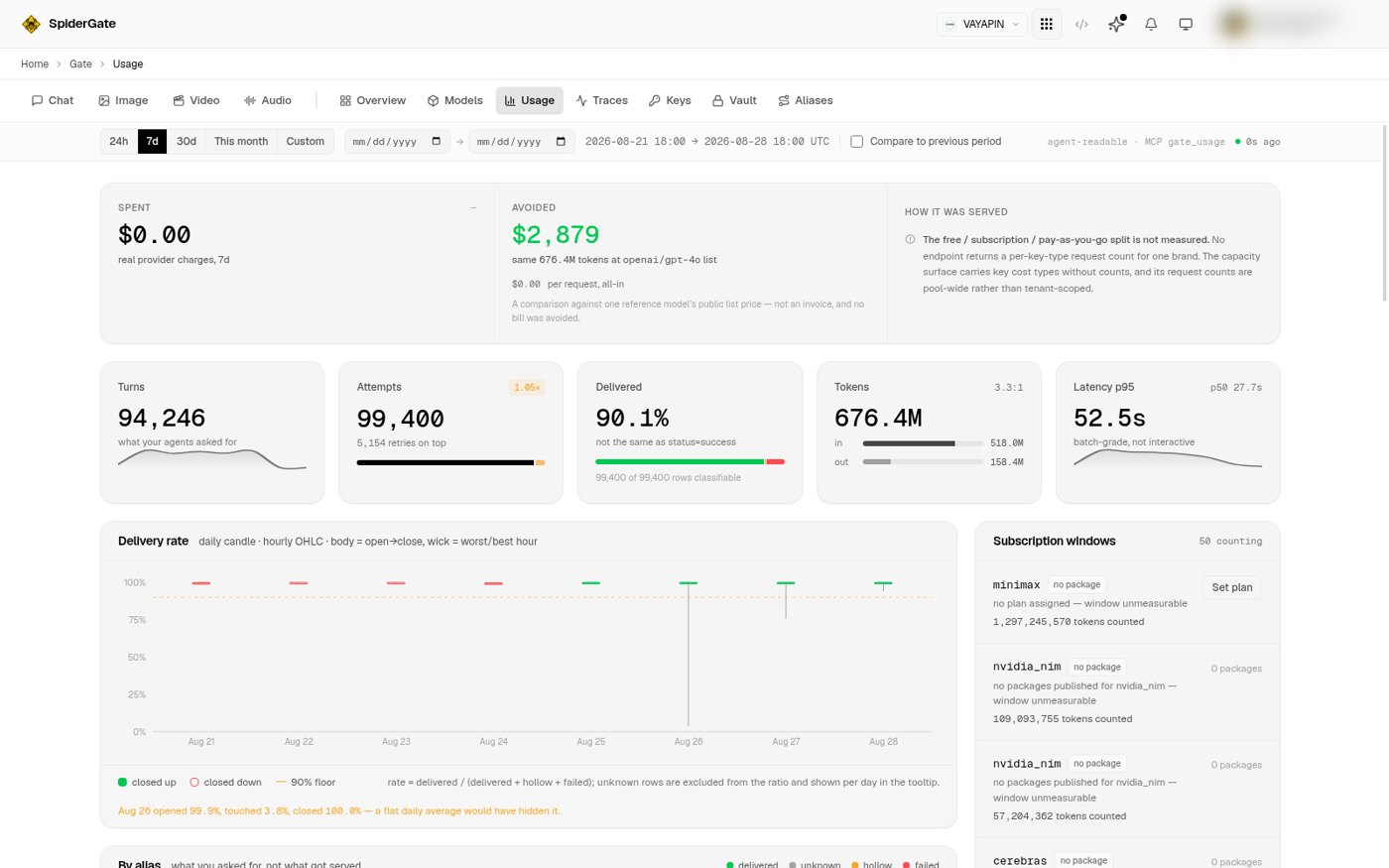
Open Gate → Usage. The range picker across the top offers 24h, 7d, 30d, This month and Custom.
This month is a calendar month, not a rolling 30 days, and the two are different windows with different totals. Pick Custom to set any start and end you like. The resolved range prints beside the picker in UTC, so you can confirm what was measured.
Tick Compare to previous period to put the immediately preceding window of equal length beside the current one.
2. Read turns against attempts before you quote a request count
Turns is what your agents asked for. Attempts includes every retry and every provider fallback underneath. The multiplier between them sits on the Attempts card.
Quoting attempts as demand overstates it. If you need one number for "how much did we ask the gateway to do", that number is turns.
3. Read the delivery split, and treat unknown as unknown
The Delivered card is a percentage, and the caption under it says what it is not: not the same as status=success. A request can return HTTP 200 with nothing in it, and the old page counted that as a success.
Every chat turn now falls into exactly one of four states, and the four sum to the total:
State | Meaning |
|---|---|
delivered | Something came back that you can use. |
hollow | The call succeeded and returned nothing. |
failed | The call errored. |
unknown | The system cannot tell, because the request predates the column that records it. |
The line under the bar tells you how many rows in this window were classifiable. unknown is never folded into delivered. If it were, a dead alias would read as healthy, which is the exact reading this page exists to remove.
Two labels overlap those states rather than adding to them. A tool-call turn returns no visible characters by construction, so it counts as delivered, not hollow. Truncated turns are annotated separately. Do not add all six together.
4. Find the alias that is failing
Scroll to By alias. Each row is one alias you actually call, with its request count, its outcome bar split into delivered, unknown, hollow and failed, average tokens in and out, how many distinct models served it, and its cost.
An alias whose bar is mostly red carries a HIGH ERR tag. An alias with no classifiable rows reads UNKNOWN with a dash for its rate, never a confident 0.0%.
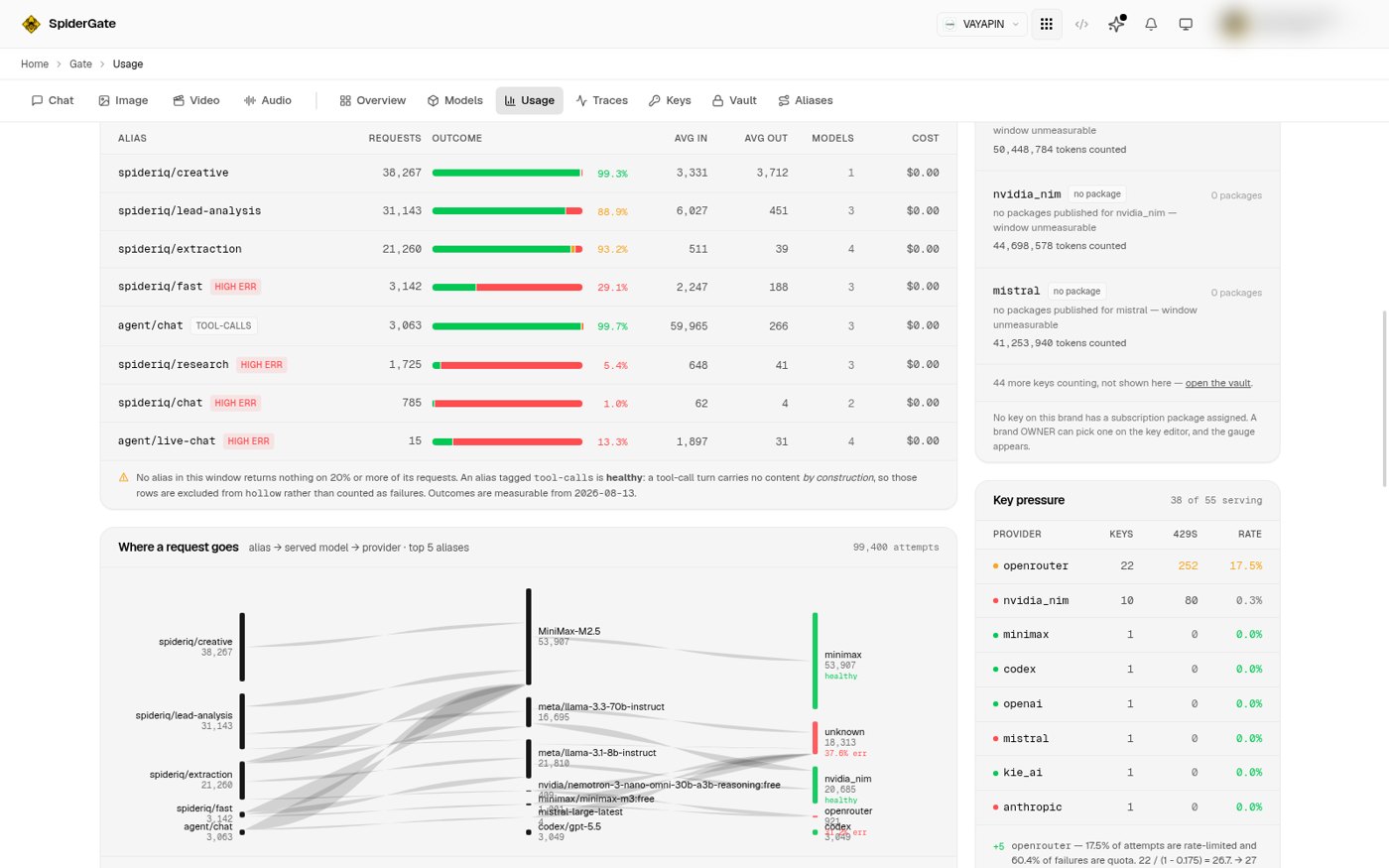
Underneath, Where a request goes links each alias to the models that answered it and the providers behind them. This is where you see an alias falling through its chain, and the provider column here is resolved through the key's own integration record rather than the wire prefix.
5. Read the key recommendation, including when it refuses
In the right rail, Key pressure lists each provider with its key count, its rate-limit responses, and its error rate. Underneath, each provider gets a verdict in words.
A verdict that recommends keys shows a target number. A verdict that does not recommend keys says so and explains why, in a sentence like more keys will not fix this, the dominant failure is not rate limiting. Where a provider publishes no limit, the panel labels its own number an estimate rather than presenting it as a published ceiling.
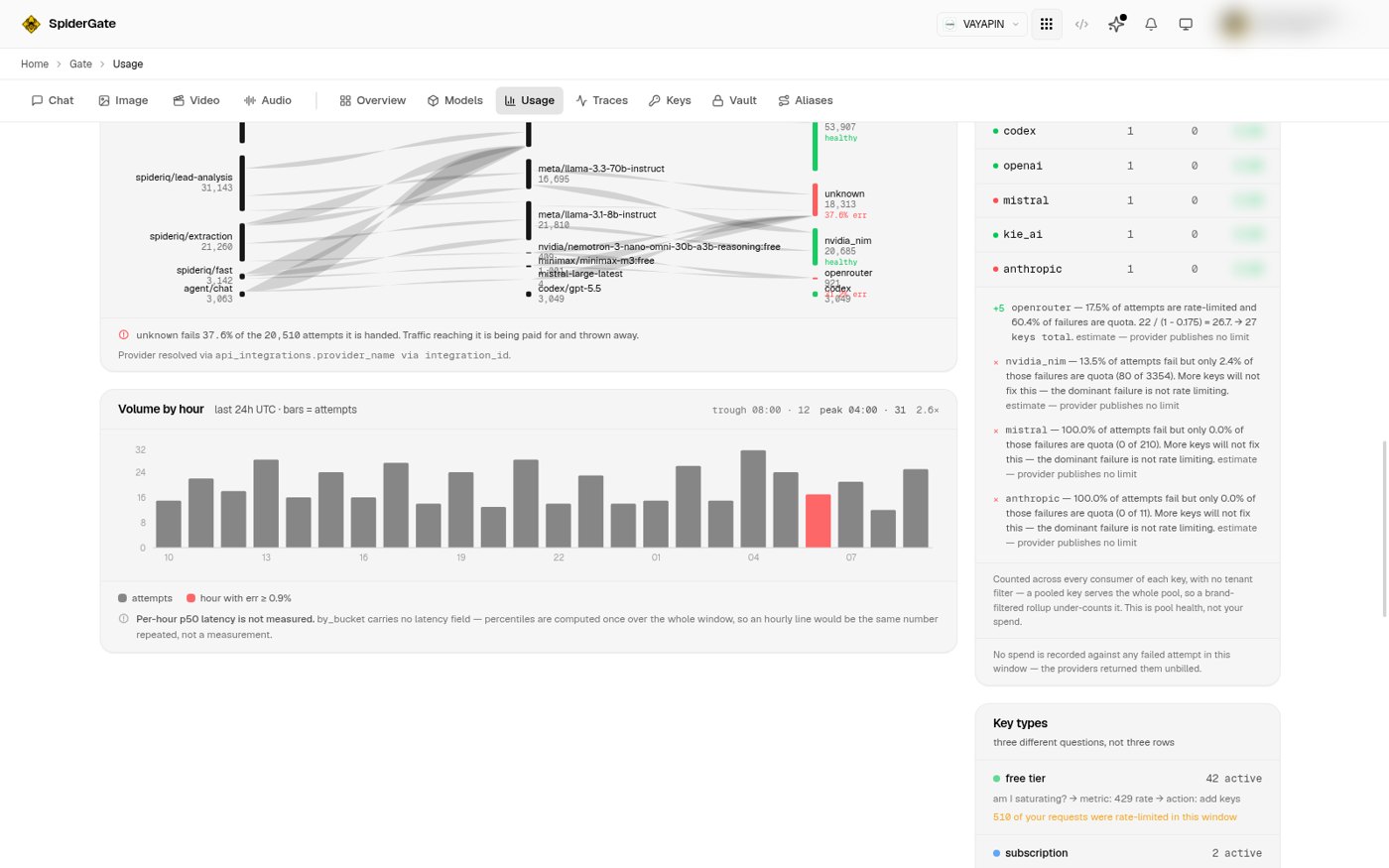
Key pressure counts every consumer of a key, with no tenant filter, because a pooled key serves the whole pool. The panel says so. It is pool health, not your spend.
6. Check a subscription plan's window
Subscription windows covers your own keys. A key with a package assigned draws a real bar against that plan's window. A key without one reads window unmeasurable and shows the tokens counted so far rather than an empty gauge, because an empty gauge and "we cannot measure this" look identical and mean opposite things.
To assign a package, use Set plan on the row, or open the key in the vault. A brand owner can do this; a member cannot.
Verify it worked
Set the range to This month and confirm the resolved range beside the picker shows the first of the month through today in UTC. The totals should differ from 30d; if they are identical, you are looking at a month that happens to be 30 days old, so try 7d instead.
Then add the four outcome numbers from the Delivered card's tooltip. They should equal the turn count exactly. If they do, the split you are reading is complete.
Troubleshoot
Delivered says a dash instead of a percentage. No rows in this window were classifiable, so there is no honest rate to show. Move the range forward past 2026-08-13.
The page shows a panel saying something is not measured. That is deliberate. Three panels report an explicit not-measured state rather than drawing a zero, because a zero and a missing measurement look the same on a chart and mean opposite things.
Cost avoided looks like money I saved. It is not. It compares the same tokens against one reference model's public list price. No bill was avoided and nothing was refunded.
Key pressure numbers are larger than my own traffic. They are meant to be. A pooled key serves every tenant using it, so this panel counts all of them. Your own spend is the panel at the top of the page.
A provider column here disagrees with the one on another chart. Trust Where a request goes. It resolves the provider through the key's integration record; the other reads a wire prefix that stamps some models under the wrong vendor.
The page failed to load instead of showing zeros. That is on purpose. This surface does not fall back to a zero-filled page, because all zeros is indistinguishable from "you used nothing". Reload.