Generating Media as an Agent
SpiderGate generates images, video and speech on the same token you already use for chat. This page is the schema-aware path: the gateway publishes what each model accepts, and you send exactly that.
It is a different endpoint from the OpenAI-compatible passthrough on Images, Audio & Embeddings. Use that one when you want an existing openai SDK call to keep working. Use this one when you want video, a non-OpenAI provider, or an agent that discovers models by itself.
Who this is for
You already call SpiderGate for chat and now you want a picture, a video clip, or a spoken line, without opening an account with a second vendor and learning a second request shape.
What you'll build
A working media generation call, driven the way an agent should drive it: ask the gateway which models are live, read the parameters that model declares, then send exactly those and get back a stored URL.
Before you begin
You need two things.
A SpiderGate token. The same client_id:api_key:api_secret triple or spideriq_pat_… you use for chat. See Authentication.
A provider key of your own. Every media model is paid tier and none of them run on the shared key pool, so media is bring your own key. Register a key for at least one media provider at The Key Vault. Without one, generation returns 503 with a code naming the provider, for example no_kie_ai_key.
What you get from the gateway is the routing, the parameter schema, the guards, the metering and the storage. The inference itself is billed by the provider, on your key.
Steps
1. Register a provider key
Open The Key Vault and add a key for the provider whose models you want to call. If the key belongs to a colleague, use the contributor invite flow so they paste it in themselves and you never handle it.
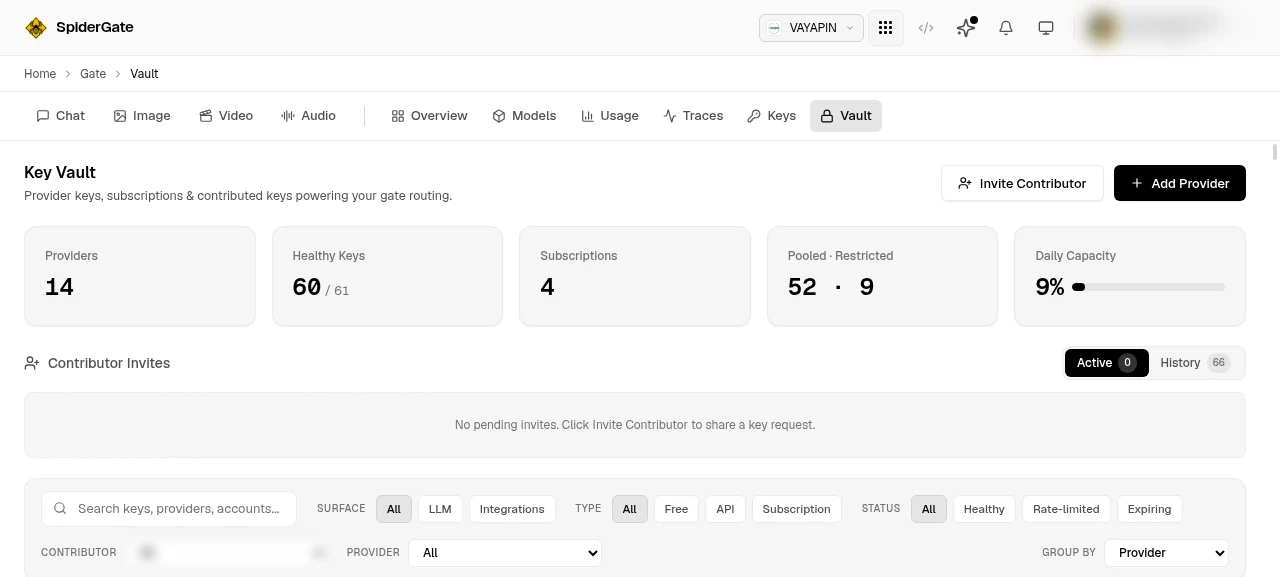
The Providers and Healthy Keys tiles tell you whether generation will work at all. If the provider you want is not in that count, generation will return 503 and name it.
2. Ask which models are live
Do not hardcode a model id. Ask, and filter to the modality you need.
curl "https://spideriq.ai/api/gate/v1/media/models?modality=text-to-video" \
  -H "Authorization: Bearer $CLIENT_ID:$API_KEY:$API_SECRET"
Models are registered well before they can serve. Only the ones this endpoint returns are generatable; pass include_inactive=true if you also want to see what is registered but not yet live.
3. Read what the model accepts
Every model publishes an inputs schema, and it is the whole contract. For kie/veo-3-fast it reads:
{
  "prompt":       { "type": "string", "required": true, "control": "textarea" },
  "aspect_ratio": { "type": "enum", "default": "16:9",
                    "enum": ["16:9", "9:16", "1:1"], "control": "segmented" }
}
Two fields: one required, one with a stated default and three legal values. A different model declares a different set. An image-to-image model asks for a source image; a lipsync model asks for audio. Read the schema rather than guessing, because a parameter the model does not declare is dropped before the provider ever sees it.
4. Generate
Send the model id and the parameters you just read.
curl -X POST "https://spideriq.ai/api/gate/v1/media/generations" \
  -H "Authorization: Bearer $CLIENT_ID:$API_KEY:$API_SECRET" \
  -H "Content-Type: application/json" \
  -d '{
    "model": "kie/veo-3-fast",
    "params": {
      "prompt": "a slow pan across an empty server room",
      "aspect_ratio": "16:9"
    }
  }'
You get back a stored URL rather than a stream of bytes to handle yourself, plus a cost breakdown. Video generation is synchronous and can take minutes.
5. Do it from an agent instead
Install @spideriq/gateway-skills from the OPVS marketplace. Its generate-media skill wraps both endpoints and validates your parameters against the declared schema before spending a call.
With the skill installed, an instruction like this is enough:
"List the SpiderGate media models, pick one that does text-to-video, and generate a 16:9 clip of a slow pan across an empty server room."
The same tools are on the CLI as spideriq gate media-models and spideriq gate media-generate.
Verify it worked
The response carries "stored": true and a data[0].url on media.spideriq.ai. Open the URL: if the asset is there, the generation succeeded and has been saved to your media library.
Check ignored_params in the response as well. It names any parameter the model did not declare, so a field you thought you were sending but which was silently dropped is still visible to you.
The request also appears in Traces, tagged with its kind (image, video, audio_tts) and its cost, next to your chat traffic.
Troubleshooting
422 invalid_param — a parameter you sent is declared by the model but the value is not legal. The message names the field and lists what it will accept. This check runs before a key is selected, so the call cost you nothing. The usual cause is a near-miss on an enum, such as sending jpeg where the model's enum reads jpg.
503 no_kie_ai_key (or another provider name) — your brand has no key registered for that provider. Add one at The Key Vault. The code always names the provider that is missing.
503 model_not_available — the model is registered but is coming_soon or disabled, so no adapter will serve it. Pick one that GET /media/models returns without include_inactive.
504 generation_timeout — the run exceeded the server wall-clock cap, which is 600 seconds for image and speech and 900 seconds for video.
A gateway timeout on a long video, where the clip turns up anyway. A generation that runs for several minutes can outlive an intermediate proxy timeout even though the run completes on our side and is billed. Before you resend, check Traces or your media library: if the asset is already there, resending simply pays twice.
The parameter I sent had no effect. It was almost certainly not declared by that model, so it was dropped. Check ignored_params in the response, then re-read the model's inputs from step 3.
Related
Images, Audio & Embeddings — the OpenAI-compatible passthrough, and the embedding aliases
API Reference — every parameter, response field and error code
The Key Vault — registering and sharing provider keys
The Studio — the same models driven by hand, with a settings panel built from the same declared schema
Traces — what a media request cost and how long it took