Task Aliases
A task alias is the value you put in the model field to ask SpiderGate for a job instead of a specific model. SpiderGate resolves the alias to a ranked chain of models and serves the first one that's healthy and available, falling back automatically down the chain.
{ "model": "spideriq/coding", "messages": [...] }There are 32 aliases in three families, and between them they carry 91 ordered fallback slots — a chain runs 2.8 models deep on average. The live, authoritative list, including each alias's full chain and recent usage, is always available at GET /api/gate/v1/aliases (no auth required):
curl "https://spideriq.ai/api/gate/v1/aliases"Treat that endpoint as the source of truth. The models below are the current head of each chain and they move as providers change.
Three families
**
spideriq/*(18 aliases) — tuned for workers**: scrapers, batch enrichers, single-shot LLM calls. Biased toward fast, low-cost providers (Cerebras, Groq, NVIDIA NIM, Mistral) because cost dominates at batch scale.**
agent/*(9 aliases) — tuned for live conversational agents**: chat interfaces, assistants, multi-turn sessions. Biased toward subscription primaries where multi-turn coherence and uptime beat per-token cost.**
opvs/*(5 aliases) — tuned for the OPVS agent platform**, which splits its traffic by job size rather than by task: a cheap lane, a simple lane, and three heavier lanes for coding, planning and review.
Pick the family by what's calling: a background job → spideriq/*; a user-facing agent → agent/*.
spideriq/* — worker aliases
::table
Alias | Use it for | Leads with | Chain depth
`spideriq/chat` | General conversation | Groq `llama-3.3-70b-versatile` | 2
`spideriq/classification` | Categorization tasks | Cerebras `zai-glm-4.7` | 3
`spideriq/coding` | Code generation, debugging, refactors | Codex `gpt-5.5` | 2
`spideriq/creative` | SEO copy and creative writing | Cerebras `gpt-oss-120b` | 4
`spideriq/design` | Design reasoning (site cloning) | MiniMax `MiniMax-M2.5` | 3
`spideriq/design-vision` | Multimodal design reasoning (screenshots) | OpenRouter `google/gemini-2.5-flash` | 1
`spideriq/extraction` | Structured data extraction, JSON output | Cerebras `zai-glm-4.7` | 4
`spideriq/fast` | Lowest-latency simple tasks | NVIDIA NIM `meta/llama-3.1-8b-instruct` | 2
`spideriq/free` | Zero-cost requests only | NVIDIA NIM `meta/llama-3.1-8b-instruct` | 2
`spideriq/lead-analysis` | B2B lead analysis and scoring | Cerebras `gpt-oss-120b` | 3
`spideriq/opvs` | OPVS symbol-notation formatting | Cerebras `gpt-oss-120b` | 4
`spideriq/planning` | Strategic planning | Groq `llama-3.3-70b-versatile` | 2
`spideriq/research` | Long-context analysis and research | Groq `llama-3.3-70b-versatile` | 4
`spideriq/research-person` | Person research reports | Groq `llama-3.3-70b-versatile` | 2
`spideriq/summarization` | Text summarization | Cerebras `gpt-oss-120b` | 4
`spideriq/tool-use` | Function calling | Groq `llama-3.3-70b-versatile` | 2
`spideriq/translation` | Language translation | Mistral `mistral-small-latest` | 3
`spideriq/vision` | Image understanding, OCR | OpenRouter `google/gemini-2.5-flash` | 1
agent/* — live-agent aliases
::table
Alias | Use it for | Leads with | Chain depth
`agent/chat` | General customer-facing conversation | Codex `gpt-5.5` | 3
`agent/coding` | Code generation, refactors, debugging | Codex `gpt-5.5` | 3
`agent/creative` | Copywriting, brand voice, narrative | Mistral `codestral-latest` | 4
`agent/fast` | Quick utility, classification, short replies | Groq `llama-3.1-8b-instant` | 4
`agent/live-chat` | Sustained multi-turn sessions where latency is felt turn by turn | Cerebras `gpt-oss-120b` | 4
`agent/planning` | Long-horizon planning, system design | Codex `gpt-5.5` | 4
`agent/research` | Long-context, multi-document synthesis | Codex `gpt-5.5` | 4
`agent/tool-use` | Heavy tool calling, multi-step, JSON | MiniMax `MiniMax-M2.5` | 4
`agent/vision` | Image understanding for agents | Mistral `pixtral-large-latest` | 1
opvs/* — OPVS platform aliases
::table
Alias | Use it for | Leads with | Chain depth
`opvs/cheap` | High-volume OPVS calls where cost dominates | NVIDIA NIM `meta/llama-3.1-8b-instruct` | 2
`opvs/coding` | OPVS code generation and refactors | Codex `gpt-5.5` | 3
`opvs/planner` | OPVS task planning and decomposition | Codex `gpt-5.5` | 2
`opvs/review` | OPVS code and output review | Codex `gpt-5.5` | 2
`opvs/simple` | Short single-shot OPVS utility calls | MiniMax `MiniMax-M2.5` | 3
Note:
spideriq/opvsis the one alias where SpiderGate injects a system prompt. It prepends OPVS notation rules so the model emits valid symbol output, and your own messages are appended after it.
Pick an alias in the dashboard
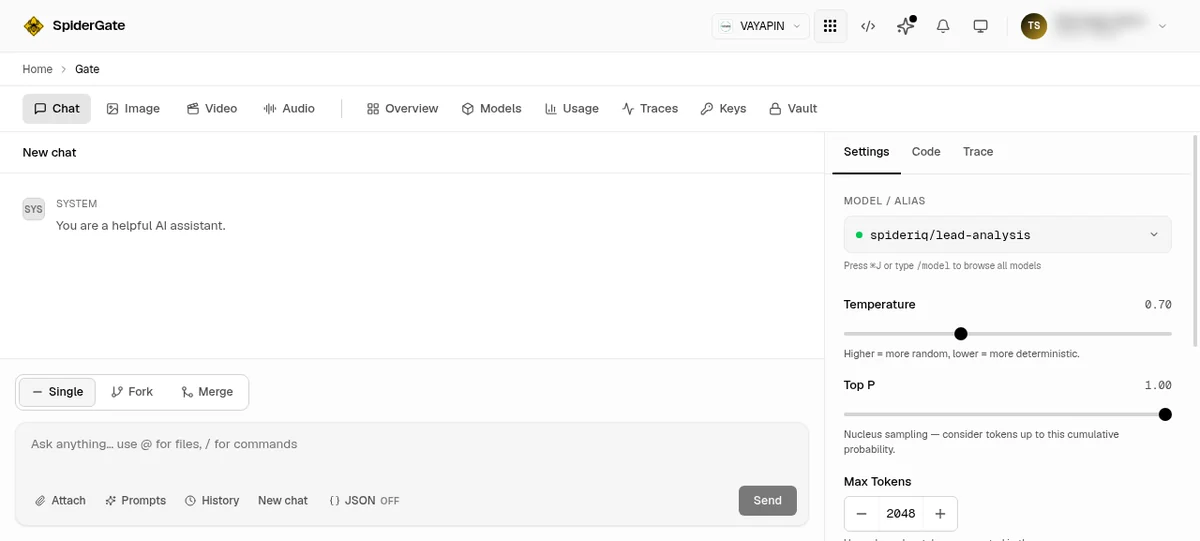
You do not have to send an alias from code to try one. The SpiderGate dashboard's Chat tab at app.spideriq.ai/dashboard/gate uses the same resolution path your agents do, so it is the quickest way to see what an alias actually serves.
The current alias is shown in the settings panel on the right, under MODEL / ALIAS:
Press ⌘J, or type /model in the composer, to open the model picker. An alias is marked with a TASK ALIAS badge and shows how it routes rather than naming a single model:
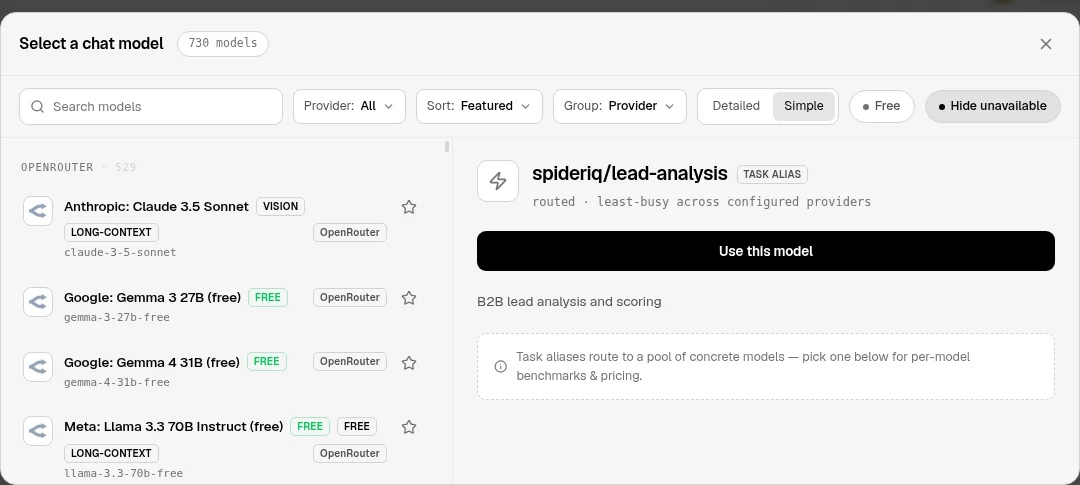
Concrete models are listed underneath, so you can compare an alias against pinning one model directly.
Tell an agent to use one
For agents, install the gateway skill and give the alias by name:
npx @opvs-ai/skills install @spideriq/gateway-skillsThen an instruction as plain as this is enough, because the skill carries the alias list and the call shape:
Use SpiderGate with the
spideriq/extractionalias to pull the contact fields out of these pages.
The skill's use-the-gateway surface covers chat completions, streaming and the alias list. See API Reference for the raw HTTP contract.
How resolution works
Resolve the alias to its configured fallback chain.
Reorder by health — models on healthy providers move to the front; models on unhealthy providers move to the back. No model is removed, so the chain always has candidates.
Try in order — call the first model; on failure (rate limit, error, timeout), move to the next.
Cross-alias fallback — if the alias's whole chain is exhausted, the request falls through to the family's general alias (
spideriq/*→spideriq/chat,agent/*→agent/chat) so a request rarely fails outright.
When the model that finally served differs from the alias's first choice, the non-streaming response carries an X-SpiderGate-Fallback-From header naming that first choice. Add ?include_route_trace=true to see every attempt — see Chat Completions.
Aliases vs. direct models
You don't have to use an alias. You can pass a concrete model id (e.g. gpt-4o) to pin a single model with no fallback chain — useful when you need exactly one model. The trade-off is that you lose automatic failover. See Models & Direct Routing.
Multi-modal endpoints (images, audio, embeddings) do not use aliases — you pass the real OpenAI model name. See Images, Audio & Embeddings.
Next steps
Send a request with your chosen alias — Chat Completions.
Inspect the full live chains at
GET /aliases— API Reference.Restrict which models or aliases a token may use — Agent Keys.